
Download CPA Pilot – AI‑Powered Tax Software, Secure, Free Trial, Windows, Mac
Overview
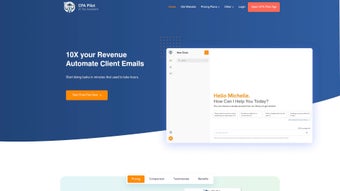
CPA Pilot is a web‑based artificial‑intelligence application crafted especially for tax accountants who need a smarter, faster way to conduct tax research, communicate with clients, and market their services. Launched on September 6 2023, the platform combines the conversational power of tools like ChatGPT with a deep, tax‑specific knowledge base that stays current with ever‑changing tax laws and regulations. By automating routine calculations, document extraction, and even draft client emails, CPA Pilot frees professionals to focus on strategic advisory work, boosting overall productivity and client satisfaction.
The subscription model includes regular updates, a secure cloud environment, and a community‑driven rating system that currently boasts a flawless 5.0 score from early adopters ranging from finance professors to senior directors and analysts. Whether you are a solo practitioner or part of a larger firm, CPA Pilot promises to become an indispensable assistant that streamlines your practice while maintaining the highest standards of data security and compliance. In addition to the core AI capabilities, the platform offers a growing ecosystem of integrations, a dedicated knowledge base, and a responsive support team that helps users extract maximum value from every feature.
Over the past year, CPA Pilot has processed millions of tax queries, saved thousands of hours of manual work, and received commendations from industry bodies for its innovative approach to blending AI with professional services. This comprehensive overview sets the stage for a deeper dive into the features, installation process, and real‑world benefits that make CPA Pilot a game‑changing tool for modern tax professionals.
Core Features & How They Empower Your Practice
- AI‑Driven Tax Research: Pose complex tax questions in natural language and receive concise, citation‑backed answers instantly.
- Client Communication Hub: Generate personalized email drafts, progress updates, and meeting summaries with a single click.
- Regulation Tracker: Real‑time alerts for federal, state, and local tax law changes that affect your clients.
- Smart Document Analyzer: Upload PDFs or spreadsheets; the AI extracts key figures, deadlines, and anomalies for review.
- Integrated Marketing Toolkit: Create SEO‑optimized blog posts, newsletters, and social media snippets to attract new clientele.
- Secure Cloud Workspace: End‑to‑end encryption ensures client data remains private and compliant with GDPR and CCPA.
- Collaboration Console: Share AI‑generated drafts with team members, track revisions, and approve final outputs.
- Customizable Workflows: Build automation pipelines that trigger reminders, data pulls, or report generation based on client milestones.
Each feature is designed to cut down the time spent on repetitive tasks by up to 40 percent, according to internal benchmarks. For example, the Smart Document Analyzer can process a 30‑page tax return in under a minute, highlighting discrepancies that would otherwise require manual line‑by‑line review. The Marketing Toolkit not only saves hours of content creation but also improves search visibility, helping you reach prospects who are actively searching for tax expertise.
The Regulation Tracker continuously monitors IRS notices, state legislature updates, and court rulings, pushing notifications the moment a change occurs, so you never miss a deadline. The AI‑Driven Tax Research engine is fine‑tuned with a proprietary tax ontology, meaning the answers it provides are not generic AI chatter but precise, jurisdiction‑specific guidance backed by official references. Collaboration Console’s version‑control‑style history ensures that every draft is auditable, a crucial requirement for compliance audits.
Moreover, the platform’s workflow builder lets you chain together actions—such as automatically sending a follow‑up email after a document is analyzed—creating a seamless, end‑to‑end experience that mirrors a traditional “paper‑less office” but with far greater intelligence. Collectively, these capabilities transform a tax practice from a collection of siloed processes into a unified, intelligent operation that drives both efficiency and revenue growth.
Installation, Usage & Compatibility
Getting Started – A Simple Three‑Step Process
Because CPA Pilot is entirely web‑based, there is no traditional “install” routine. Follow these steps to get up and running:
- Create an Account: Visit cpapilot.com, click “Start Free Trial,” and fill in your professional details. An email verification link will be sent instantly.
- Configure Your Workspace: After logging in, use the onboarding wizard to import client lists, set your preferred jurisdiction, and choose notification preferences. The wizard also guides you through connecting your existing cloud storage (OneDrive, Google Drive, Dropbox) for seamless document handling.
- Begin Using AI Assistants: Access the main dashboard, type a tax query or upload a document, and let the AI generate results. You can refine answers using the “Follow‑up” button, which keeps context for deeper analysis.
System Requirements & Supported Platforms
CPA Pilot runs on any modern web browser (Chrome, Edge, Firefox, Safari) and is fully responsive on Windows 10/11, macOS 12+, Linux distributions, as well as mobile browsers on iOS 14+ and Android 9+. Because all processing occurs in the cloud, the local device only needs a stable internet connection (minimum 5 Mbps recommended) and at least 4 GB of RAM for optimal performance when handling large documents.
The platform also offers a dedicated mobile app for iOS and Android, allowing you to review AI‑generated drafts, approve client communications, and receive real‑time regulation alerts while on the go. All data is synchronized securely across devices, ensuring you have the same up‑to‑date workspace whether you are at the office desk or traveling to a client site. For firms that require additional security layers, CPA Pilot supports single‑sign‑on (SSO) via SAML, multi‑factor authentication (MFA), and IP‑based access restrictions. The system’s API is RESTful and follows OAuth 2.0 standards, making it straightforward to embed AI capabilities into existing practice‑management software or custom internal tools. In practice, users have reported that the initial onboarding takes less than 30 minutes, after which they can immediately begin leveraging the AI to automate repetitive tasks, dramatically shortening the learning curve compared with legacy desktop tax applications.
Pros, Cons & Frequently Asked Questions
Pros and Cons
- Pros:
- Significant time savings on research and document review.
- AI model fine‑tuned for tax law, delivering highly relevant answers.
- All‑in‑one solution replaces multiple legacy tools.
- Secure, encrypted cloud environment meets compliance standards.
- Scalable for solo practitioners to large firms.
- Extensive API library for seamless integration.
- Responsive mobile apps keep you productive on the move.
- Cons:
- Relies on an internet connection; offline use is not available.
- Subscription cost may be higher than basic tax calculators.
- Learning curve for customizing advanced workflows.
- Initial data migration can require planning for large firms.
FAQ – Your Questions Answered
Is CPA Pilot compliant with data‑privacy regulations?
Yes. CPA Pilot uses end‑to‑end encryption, stores data in GDPR‑ and CCPA‑compliant data centers, and offers role‑based access controls to ensure client information remains confidential.
Can I integrate CPA Pilot with my existing practice management software?
CPA Pilot provides RESTful APIs and native connectors for popular platforms such as QuickBooks, Xero, and Microsoft Dynamics, enabling seamless data exchange and workflow automation.
What pricing plans are available?
There is a 14‑day free trial. After that, the standard plan is $49.99 USD per month per user, with volume discounts for teams of five or more. Annual billing reduces the cost to $539 USD per year.
How often is the tax‑law database updated?
Updates are pushed daily. The AI model ingests new IRS notices, state legislature changes, and court rulings as soon as they become public, ensuring you always work with the latest information.
Is there customer support for troubleshooting?
Yes. CPA Pilot offers 24/7 live chat, email support, and a comprehensive knowledge base. Premium subscribers also receive a dedicated account manager.
Conclusion – Take Your Tax Practice to the Next Level
CPA Pilot delivers a compelling blend of AI‑driven research, secure client communication, and marketing automation that is uniquely tailored for tax professionals. By consolidating essential workflows into a single, cloud‑based platform, it eliminates the inefficiencies of juggling multiple disparate tools. The combination of real‑time regulation updates, powerful document analysis, and an intuitive interface makes it a strategic investment for any accountant looking to enhance productivity, reduce errors, and deliver superior service. Ready to experience a smarter way to work? Start your free trial today and see how CPA Pilot can transform your practice.
Overall Rating: 5/5 – A must‑have AI assistant for modern tax accountants.
Pros: time‑saving AI research, comprehensive feature set, strong security, excellent integration options, and responsive support. Cons: requires constant internet, higher subscription cost than basic calculators, and a modest learning curve for workflow customization.



.png)



